MeeBhoomi
Meebhoomi (మీ భూమి), which translates to "Your Land" in Telugu, is the official online land records management system launched by the Revenue Department of Andhra Pradesh. Launched with the vision of bringing transparency, efficiency, and convenience to land administration, it acts as a centralized digital repository for all land-related data across the state.
MeeBhoomi provides easy access to Andhra Pradesh land records such as Adangal, 1B, and Village Maps.
| Field | Detailed Information |
|---|---|
| State | Andhra Pradesh (AP) |
| Portal Name | "Meebhoomi (Telugu for ""My Land"")" |
| Launched By | Government of Andhra Pradesh (GoAP) |
| Launch Date | June 2015 (Launched as part of the Digital India initiative) |
| Under Department | "Department of Revenue, Andhra Pradesh" |
| Managed By | "Department of Revenue (Specifically, the Chief Commissioner of Land Administration (CCLA) office)" |
| Key Documents |
1B (Record of Rights): The primary ownership record, vital for legal and financial transactions. ,"Adangal (Pahani): A detailed document about cultivation, crops grown, soil type, and liabilities on the land." |
| Other Services | "Village Map, Field Measurement Book (FMB), E-Passbook, Mutation (Title Transfer) Status, Aadhaar Linking Status." |
| Objective | To bring transparency, efficiency, and easy online access to land records for all citizens of Andhra Pradesh. |
| Official Website | meebhoomi.ap.gov.in |
Key Services and Documents You Can Access
The portal allows you to view and download critical land-related documents from the comfort of your home. Some of the most important services include:
Adangal (or Pahani): This is a detailed record that contains information about the land use, crops grown, soil type, irrigation sources, and other agricultural details for a specific survey number. Farmers often need this for crop insurance and subsidies.
1-B (Record of Rights - ROR): This is a key legal document that shows the ownership details of the land, including the owner's name, the Khata number, the extent of the land, and other legal rights and liabilities. It's vital for verifying ownership before a purchase or for securing bank loans.
Village Maps and FMB (Field Measurement Book): You can view the geographical layout and accurate boundary measurements of land plots within a village.
Electronic Passbook (E-Passbook): This is the digital version of the land ownership passbook, which serves as official proof of land ownership.
Aadhaar Linking Status: You can check the status of linking your Aadhaar number with your land account for enhanced security and verification.
Application Status: You can track the status of applications for mutation (change of ownership), land conversion, and other services.
| Feature | Adangal (Pahani) | 1B (Record of Rights) |
|---|---|---|
| Primary Purpose | To check Land Use and who is farming. | To prove Legal Ownership (Title). |
| Main Content | "Crop details, soil type, irrigation source." | "Owner's name, Khata number, history." |
| Updated | Every season (Kharif/Rabi) by the VRO. | Only when the land is sold or inherited. |
| Legal Status | Proof of possession/cultivation. | Ultimate legal proof of ownership. |
| Best For | Getting Crop Loans or Subsidies. | Selling land or getting Bank Loans. |
| Key Info Included | "Type of crops grown, water rate, survey sketch." | "Mutation dates, previous owners, liabilities." |
| Issued By | Village Revenue Officer (VRO). | Tahsildar / Revenue Department. |
Related Pages
How to Correct Names in Adangal & 1-B
The Problem: Your name or your father’s name is misspelled, leading to issues with bank loans or PM-Kisan benefits.
The Solution:
- Step 1 (Online): Visit the official Meebhoomi portal and look for the "Corrections" tab. Select "Correction in Computerized Adangal."
- Step 2: Enter your District, Mandal, Village, and Survey/Khata number.
- Step 3: Click the 'Edit' button next to the name field. Enter the correct name as per your Aadhaar.
- Step 4: Upload a scanned PDF of your supporting document (Aadhaar or Registered Sale Deed).
- Step 5: Note the Complaint Number for tracking.
Important: If the online request is not approved within 15 days, you must proceed with the Offline Process below.
Survey Number Mismatch: What to Do?
The Problem: Your physical land area or boundary doesn't match what is shown on the Meebhoomi map or Adangal record.
The Solution:
- Check the FMB Map: Download your FMB (Field Measurement Book) from Meebhoomi. This shows the original survey sketches.
- Verify the Error: Compare the FMB with your Registered Sale Deed.
- Apply for a Re-Survey: You cannot fix survey mismatches online. You must submit a request at the MeeSeva center for a "Surveyor Inspection."
- Field Visit: A government surveyor will visit your land to verify the boundaries. Once they submit their report to the Tahsildar, the records will be updated online.
Land Dispute Guide: Prohibited & Court Cases
The Problem: You want to buy land but aren't sure if it’s "safe."
How to Check:
- Prohibited Properties (Section 22A): Go to the "Prohibited Lands" section on Meebhoomi. Enter your survey number. If the land appears here, it belongs to the Government, Endowment (Temple), or is "Assigned Land" that cannot be sold.
- Court Cases: Check the "Survey No. Dispute Register" on the portal. This will list any ongoing legal battles, the petitioner’s name, and the case status.
- Warning: Never pay an advance for land that appears in either of these lists without legal clearance.
The Offline Process: Visiting the MRO Office
The Problem: The online portal is stuck, or your correction request was rejected.
The Solution:
If online methods fail, you must visit the Mandal Revenue Office (MRO) or the Tahsildar.
Documents You MUST Take:
- Identity Proof: Original and Xerox of your Aadhaar Card.
- Ownership Proof: A copy of your Registered Sale Deed or the old Pattadar Passbook.
- Encumbrance Certificate (EC): Shows the history of the land for the last 13–30 years.
- Application Form: Obtain the "Land Record Correction Form" at the office or MeeSeva.
- VRO Recommendation: It is often helpful to talk to your Village Revenue Officer (VRO) first, as they provide the initial verification report to the MRO.
Land Records Service Fees
| Service Name | Where to Obtain (Channel) | Fee (₹) |
|---|---|---|
| Certified Copy of ROR–1B (Record of Rights) | Through your service center/secretariat | 40/- |
| Adangal certified copy | Through your service center/secretariat | 40/- |
| Copy of FMB (Field Measurement Book) | Through your service center/secretariat | 40/- |
| LP Map (Land Parcel Map) | Through your service center/secretariat | 40/- |
| ROFR Adangal / Village 1B | Through your service center/secretariat | 40/- |
| Electronic Passbook (E-Passbook) | Through your service center/secretariat | According to the fixed fee |
| Aadhaar Linking | Through your service center/secretariat | Free |
| List of Land Disputes / Dispute Register | Through your service center/secretariat | Free |
| Mutation Application | Through your service center/secretariat | 150/-) |
How to Access Records on the Meebhoomi Portal
Here are the key land records you can check on the Meebhoomi portal, along with the step-by-step instructions:
1. Checking Your Adangal (Cultivation and Land-Use Report)
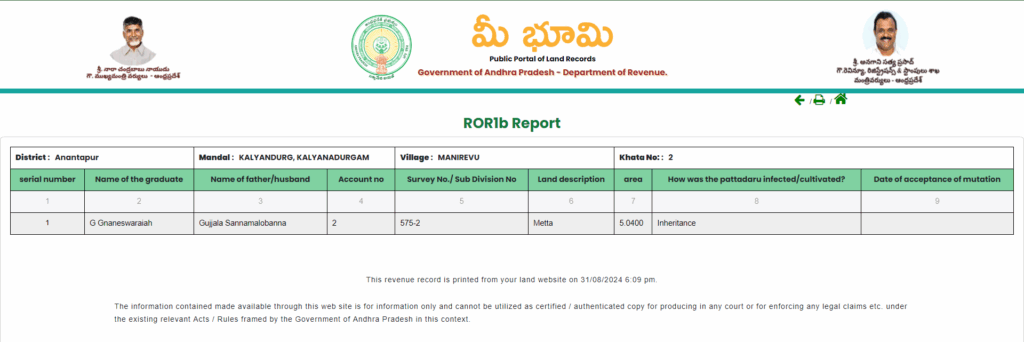
The Adangal provides details on the land type, crops grown, and ownership.
-
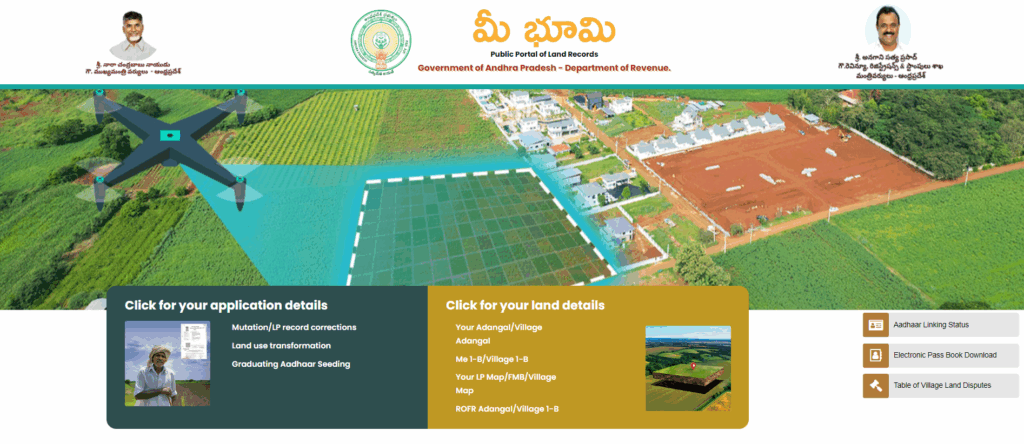
Step 1: On the homepage, look for and click the link for "మీ అడంగల్ / గ్రామ అడంగల్" (Your Adangal / Village Adangal).
- Step 2: Choose "మీ అడంగల్" (Your Adangal) to search for your specific land parcel.
- Step 3: Use the dropdown menus to select your District, Mandal, and Village.
- Step 4: Select your preferred search method: you can search using your Survey Number, Account Number (Khata No.), or Aadhaar Number.
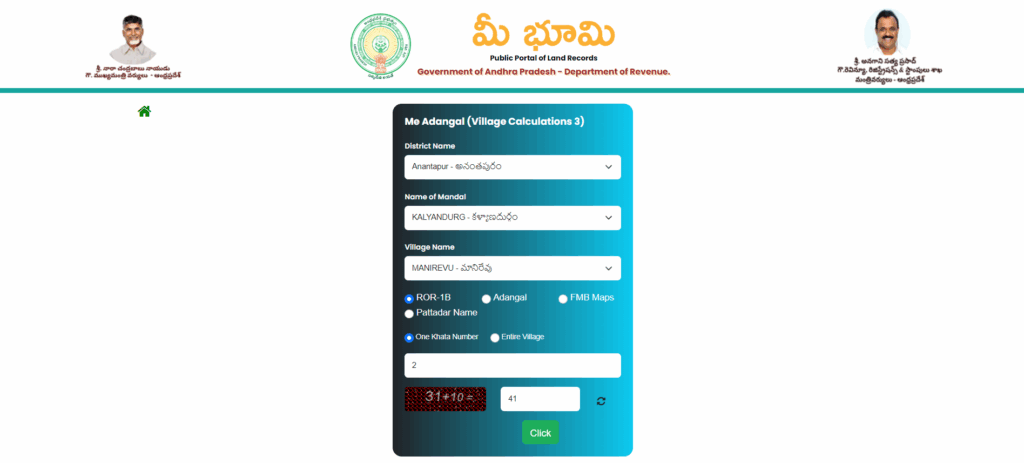
- Step 5: Enter the corresponding number (or name) based on your selection.
- Step 6: Enter the Captcha code shown on the screen and click "Click" or "Submit" to view the report.
2. Checking Your 1-B / Record of Rights (ROR) (Ownership Verification Report)
The 1-B is the key legal document that officially confirms and establishes who the land owner is.
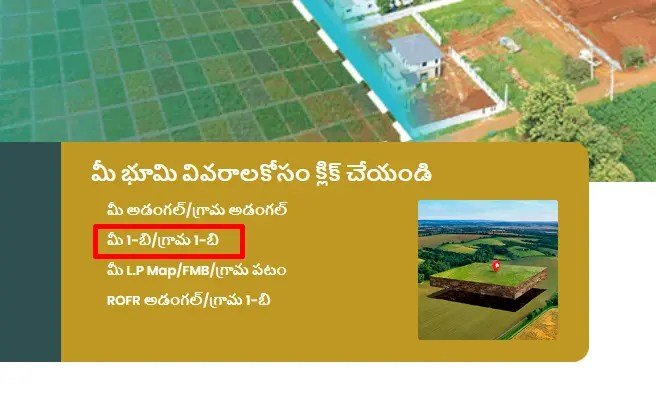
- Step 1: On the homepage, find and click the link for "మీ 1-బి / గ్రామ 1-బి" (Your 1-B / Village 1-B).
- Step 2: Choose "మీ 1-బి" (Your 1-B) to search for your specific land parcel.
- Step 3: Use the dropdown menus to select your District, Mandal, and Village.
- Step 4: Select your preferred search method: you can search using your Survey Number, Account Number (Khata No.), Aadhaar Number, or Pattadar Name.
- Step 5: Enter the corresponding number or name based on your selection.
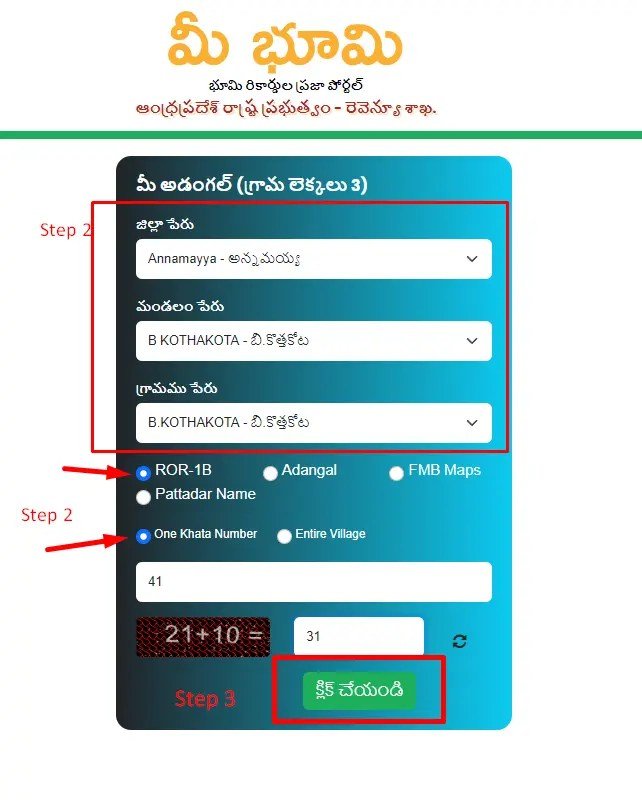
- Step 6: Enter the Captcha code and click "Click" or "Submit" to view the report.
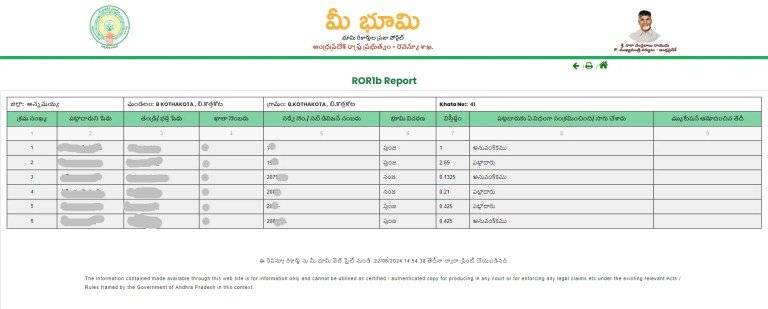
3. Downloading the Electronic Passbook (E-Passbook)
The E-Passbook is the official digital proof of your land ownership.
- Step 1: On the homepage, click on "ఎలక్ట్రానిక్ పాసు పుస్తకం" (Electronic Passbook).
- Step 2: Enter your geographic details: District, Mandal, Village, and your Account Number.
- Step 3: Provide your Registered Mobile Number and complete the Captcha.
- Step 4: An OTP (One-Time Password) will be sent to your mobile phone. Enter the OTP to successfully download the PDF of your E-Passbook.
| Document | Type | Description |
|---|---|---|
| Adangal | Village Land Record | Shows who is actually farming the land during the current year. |
| 1-B | Record of Rights | The most important document used to prove ownership of land. |
| FMB | Field Measurement Book | A map that shows the exact shape, size, and boundaries of a land parcel. |
| Mutation | Transfer of Ownership | The legal process of updating land records after buying or inheriting land. |
4. Aadhaar Linking & Status Check
Why this matters: Linking your Aadhaar acts like a "digital lock" on your property. It prevents others from selling your land without your knowledge.
- Service Name: Aadhaar Seeding / Linking
- The Process:
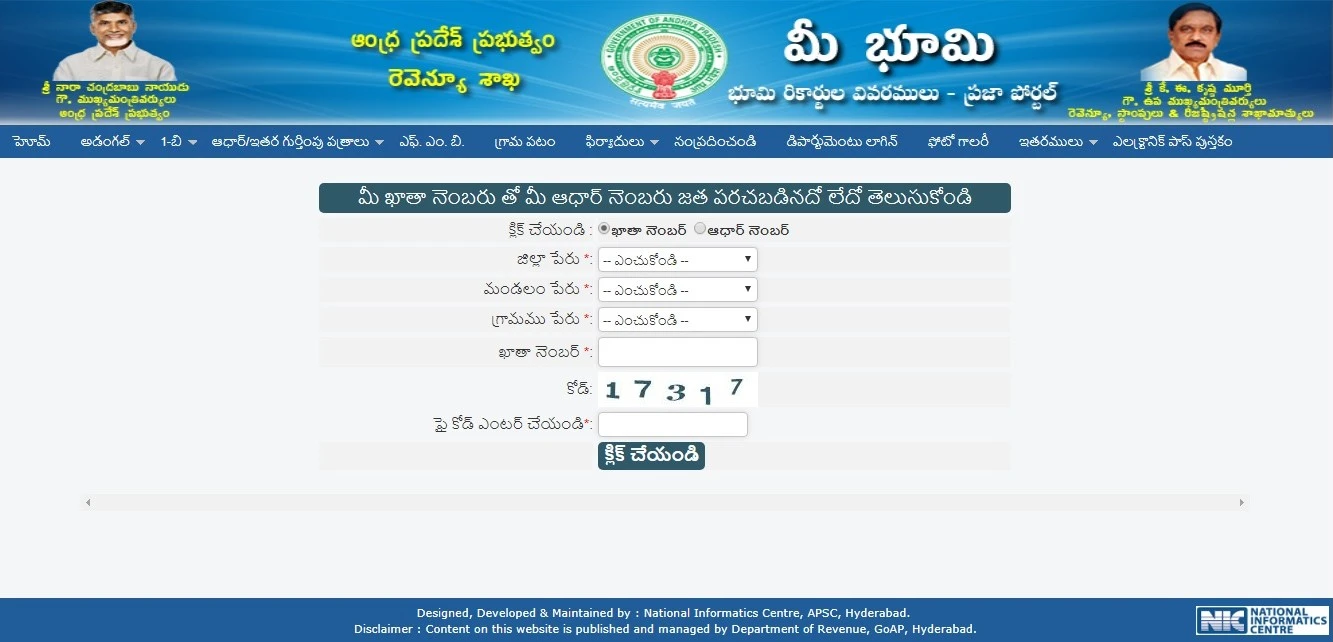
- Navigate to the "Aadhaar/Other Identities" menu on the official portal.
- Select "Aadhaar Linking" to seed your number or "Aadhaar Status" to check if it's already done.
- Select your District, Mandal, and Village.
- Search using either your Account (Khata) Number or your Aadhaar Number.
- Enter the Captcha and click "Submit."
5. Field Measurement Book (FMB) & Village Maps
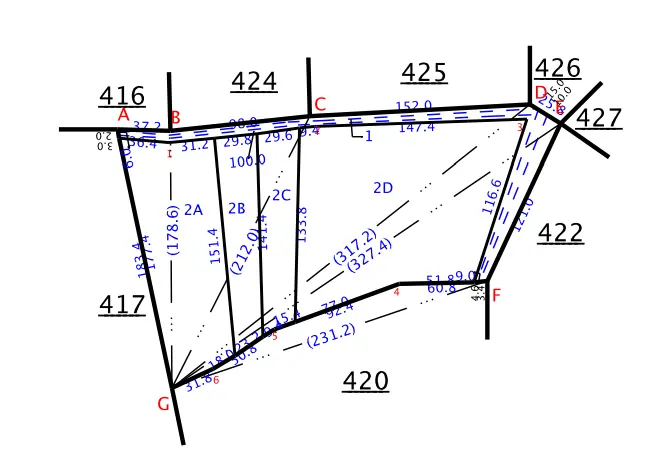
Why this matters: Never buy land based on just a fence. The FMB map is the only legal sketch that shows the precise shape, sub-division lines, and boundary measurements of a plot.
- Service Name: Your L.P Map / FMB / Village Map
- The Process:
- Click on the "L.P Map / FMB" option on the homepage.
- Choose your District, Mandal, and Village from the dropdown menus.
- Enter the Survey Number of the plot.
- Solve the Captcha.
- Tip: Use a desktop or laptop to view these maps, as the PDF sketches are very detailed and can be hard to read on a small mobile screen.
6. Track Application & Mutation Status
Why this matters: After you buy land, you apply for a "Mutation" (changing the name in the record). This tool tells you if the VRO or Tahsildar has approved your request.
- Service Name: Application Status (మీ ఫిర్యాదు స్థితి)
- The Process:
- Look for the "Complaints" or "Application Status" tab.
- You can search using your Application ID (provided at the MeeSeva center) or your Complaint Number.
- Select the District and Document Type (e.g., Mutation or Name Correction).
- The system will show if your status is:
- Pending: Still being verified by the VRO.
- Approved: Your name is now officially updated in the records.
- Rejected: You must visit the MRO office to see what documents are missing.
Note
"Stuck on 'Pending'?"
If your Mutation or Aadhaar linking status has been "Pending" for more than 15 days, it usually means the digital signature of the VRO is missing. We recommend visiting your local Mandal Revenue Office (MRO) with your application ID to speed up the process.
Contact Details
| Contact Type | Details |
|---|---|
| Toll-Free Phone Number | 14400 |
| Email ID | meebhoomi-ap@gov.in |
FAQ's
What is the Meebhoomi Portal?
Meebhoomi is the official digital land records management system of the Government of Andhra Pradesh. Its main goal is to provide citizens with easy, online access to their land records, thus ensuring transparency.
What are the two most important documents available on Meebhoomi?
The two most important records are:
- Adangal (or Pahani): The detailed agricultural and land-use report, showing crops, soil type, and liabilities.
- 1-B (or ROR): The Record of Rights, which legally confirms land ownership and associated details.
How can I search for my land records on the portal?
You can search for your records by providing the District, Mandal, and Village name, and then using your Survey Number, Account Number (Khata No.), or Aadhaar Number as the search criteria.
Can I get a copy of my ownership proof from Meebhoomi?
Yes. You can download the Electronic Passbook (E-Passbook), which is the official digital copy of your land ownership certificate (Pattadar Passbook), after verifying your details and mobile number with an OTP.
Is there a way to check for land disputes online?
Yes. The Meebhoomi portal provides a Village Land Dispute Register where you can check if a specific land parcel (Survey Number) is involved in any ongoing court case or revenue dispute.
What is the Field Measurement Book (FMB) on the portal?
The FMB is a set of maps and sketches that shows the precise measurements and boundaries of your land parcel. It is essential for verifying the physical dimensions of the property.